A paper is more than its .tex files. meertex keeps all of it.
meertex is a LaTeX editor for the whole life of a paper, from the call for
papers to camera-ready. Each paper carries its venue, its deadlines with
countdowns and every version you handed in. meertex checks that your citations
exist, and reviewers see how each of their comments was addressed.
You write on your own computer, in VS Code, vim or together with an LLM agent.
Every save reaches your coauthors within a second.
They edit the same document in the browser, with live cursors and a PDF that
compiles as they type. A command line tool and an API make all of it ready for
your LLM workflow.
Free to use at meertex.com. Sign in with your email address, no password needed.
There is also a desktop app for macOS, Windows and Linux.
meertex is open source, and the
README
explains how to run it on your own server. It is part of the
Meerverse, the family of meer* apps.
Tour
meertex in two minutes
A narrated tour of the real app, filmed with a made-up demo account. Watch a
save in vim reach a coauthor's browser, the reference check catch a citation
that does not exist, and a review on the PDF.
How it works
What GitHub is for code, meertex is for papers
GitHub keeps a project's code in one place, with its history, its releases and
the reviews around it. meertex does the same for a paper and adds what only
papers have: a venue, deadlines and a bibliography that has to hold up. There
is nothing to commit or push. Every save reaches all your computers and every
coauthor within a second.
Repository
Paper
Its files and coauthors together with its venue, every deadline and the outcome.
Push and pull
Live sync
A normal folder on each of your computers that follows every edit, from you and from everyone else.
Commit history
History
The server commits the paper to git while you write, so every earlier state is still there.
Pull request review
Reviews
Comments on the text or right on the PDF, suggestions applied with one click and an email to everyone involved.
Releases and tags
Versions
Submission, rebuttal, revision and camera-ready, kept for good with their PDFs. Any two compare as a PDF with every change marked.
CI checks
Checks
A PDF two seconds after the last edit, spelling and grammar as you type, and every citation looked up at Crossref, DBLP and arXiv.
Milestones
Deadlines
Every date in the venue's time zone, with countdowns, reminder emails and a question once it has passed.
Forks
Resubmissions
A rejected paper goes to the next venue as a fork that keeps its files and links back.
Like git, without commit and push
Each paper is one live document. Your laptop, your desktop, every open browser
tab and every coauthor see the same text. When two people type at the same
time, both edits are kept.
Your computers
A normal folder
~/papers/2027-icse-green-llm
Check it out on as many computers as you like. Edit it with any editor, or let an LLM agent write with you. meertex sends every save to the server.
within a second
meertex
The live document
Everyone's edits come together here. meertex keeps a history you can go back to, saves the versions you handed in and compiles the PDF.
live
Your coauthors
The browser editor
Everyone's cursor with their name, LaTeX autocomplete, the PDF next to the text, and reviews that show how each comment was addressed.
Features
Everything a paper needs
Next to its text, a paper has coauthors, a venue, deadlines, the versions you
handed in, reviews and a bibliography that has to hold up. meertex looks after
each of them.
Your folder, always up to date
meertex keeps the paper's folder on your computer in step with everyone
else's edits. Files that a coauthor deleted go to a trash folder, so nothing
is lost. The files LaTeX writes while it compiles, such as .aux
files and your local PDF, stay on your computer.
$ meertex checkout 2027-icse-green-llm
$ meertex service install
Coauthors in the browser
The browser editor works on the same document as your checkout, with everyone's
cursor and name. Autocomplete knows LaTeX commands and environments, every
\label in the project, the keys of every .bib file and
the paths for \input and \includegraphics. Invite
people by email as editors, reviewers or viewers.
A PDF that keeps up
The PDF compiles two seconds after the last edit, with pdfLaTeX, XeLaTeX or
LuaLaTeX. Errors and warnings show up in a list, and a click opens the right
line. Click the PDF to jump to the source, or jump from the text to its
spot in the PDF.
Every paper knows its venue
Conference, track, links, page limit, template and every date from abstract
registration to camera-ready, in the venue's time zone (AoE by default).
Countdowns turn amber two weeks out and red in the last three days. A deadline
that moved says so.
Paper submissionin 2 daysNotification, moved from 31 Octin 9 daysCamera-readyin 7 weeks
It asks when a date passes
Once a deadline is over, meertex asks what happened. “Did you hand it in?”
freezes the submission version from the state at the deadline, even when you
answer three days late. “Was it accepted?” sets the outcome, so all your
accepted papers are one filter away.
Did you hand it in?Did you send a rebuttal?Was the paper accepted?
Versions you can point to
Submission, rebuttal, Revision N and camera-ready are saved for good, with the
compiled PDF, the source as a zip and the PDF you actually uploaded. Compare
any two by lines, by words, or as a PDF with every change marked.
submissionrebuttalrevision-1camera-ready
Citations that exist
Language models make up citations that look right: a real author with a title
they never wrote, a DOI that belongs to another paper, a link that was never
there. meertex looks up every entry of your .bib files at doi.org,
Crossref, Semantic Scholar, DBLP, arXiv and Open Library, and opens every link.
It shows what does not match, with the publisher's value one click away, and it
finds retracted papers and preprints that have been published since.
On request, an LLM reads each cited abstract and says whether it backs the
sentence that cites it. When you checked an entry yourself, mark it. The mark
lives in the entry and breaks as soon as anyone changes it.
DOI of another paperIn no indexRetractedNot the record's authorsDead linkChecked by you
$ meertex refs 2027-icse-green-llm check
An LLM agent next to the text
In the desktop app the editor has an agent panel, as a
fourth column next to the PDF or under the text. Ask it to tighten a paragraph,
fix a table or address a reviewer's comment, and it edits your checkout of the
paper. Its changes reach the editor and your coauthors within a second, and the
History keeps every one of them.
It knows which file you have open and which lines you selected. It edits the
paper's files on its own and asks you before it runs a command or looks outside
the paper's folder. It is the Claude Code of your computer with your own sign-in,
or a local model in Ollama that never sends the paper anywhere.
Fourth column or under the textKnows your selectionAsks before commandsClaude CodeOllama
Reviews you can follow up on
A reviewer comments on a passage of text, or double-clicks the PDF and meertex
finds the line. A suggestion carries new text that the authors apply with one
click. When a comment is resolved, meertex shows how the text changed, and the
reviewer accepts it or reopens the comment. Everyone involved gets an email.
Folders, names and templates
Each coauthor sorts papers into their own folders. Names follow your pattern.
Start from a publisher's template zip, such as ACM's acmart or IEEE's kit, and
resubmit a rejected paper to the next venue as a copy that keeps its files.
Sign in at meertex.com with an emailed link or code, with no password to
remember. Coauthors only need a browser. meertex is open source under the
AGPL-3.0-or-later, so you can also run it on your
own server.
Screenshots
See it
Real screenshots of a running meertex with a made-up demo account. Open one to see it full size.
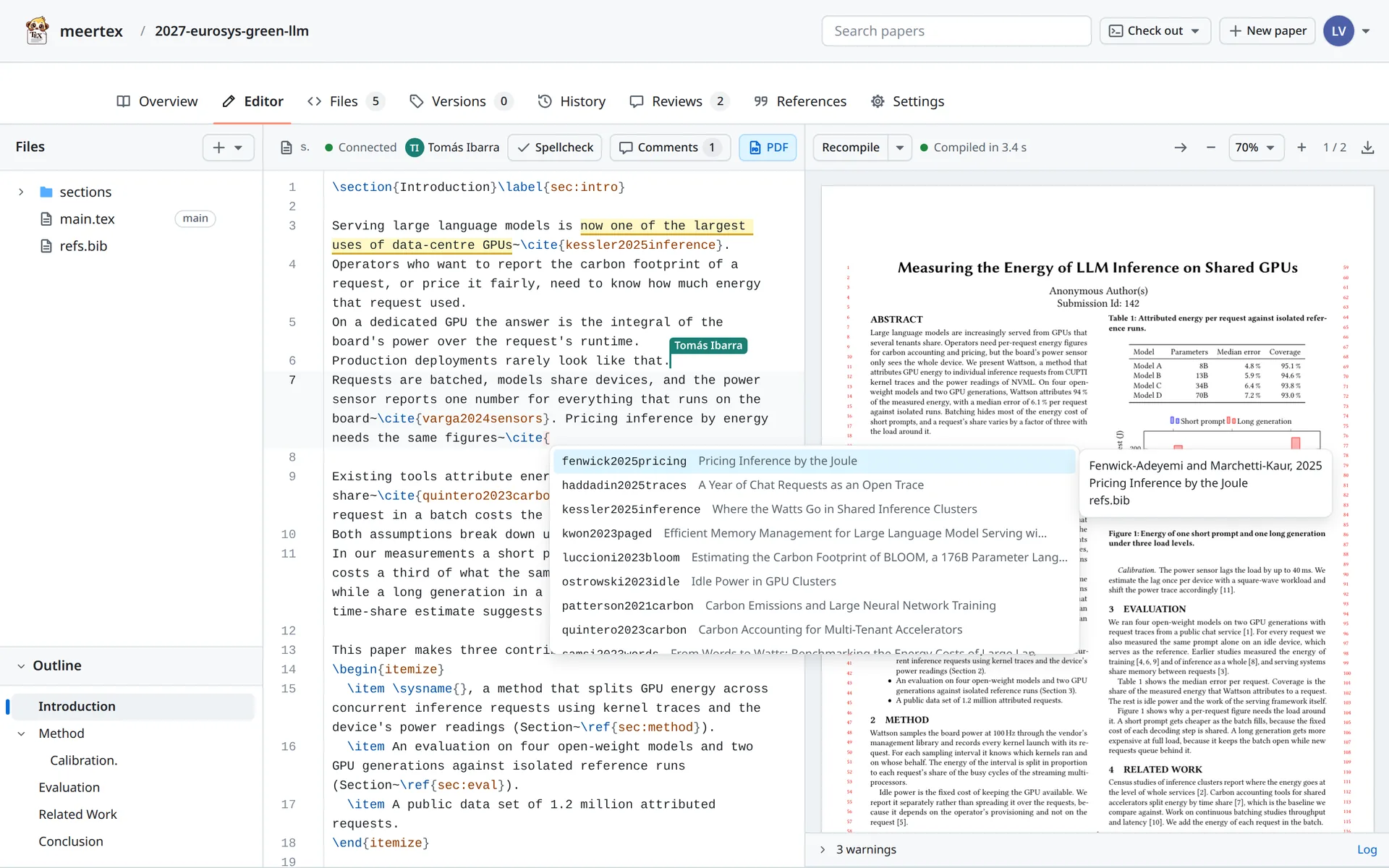
The editor
Lena writes the introduction while Tomás has the same file open. The
\cite completion lists every key of the paper's .bib
with its title, and the PDF on the right compiled a moment ago.
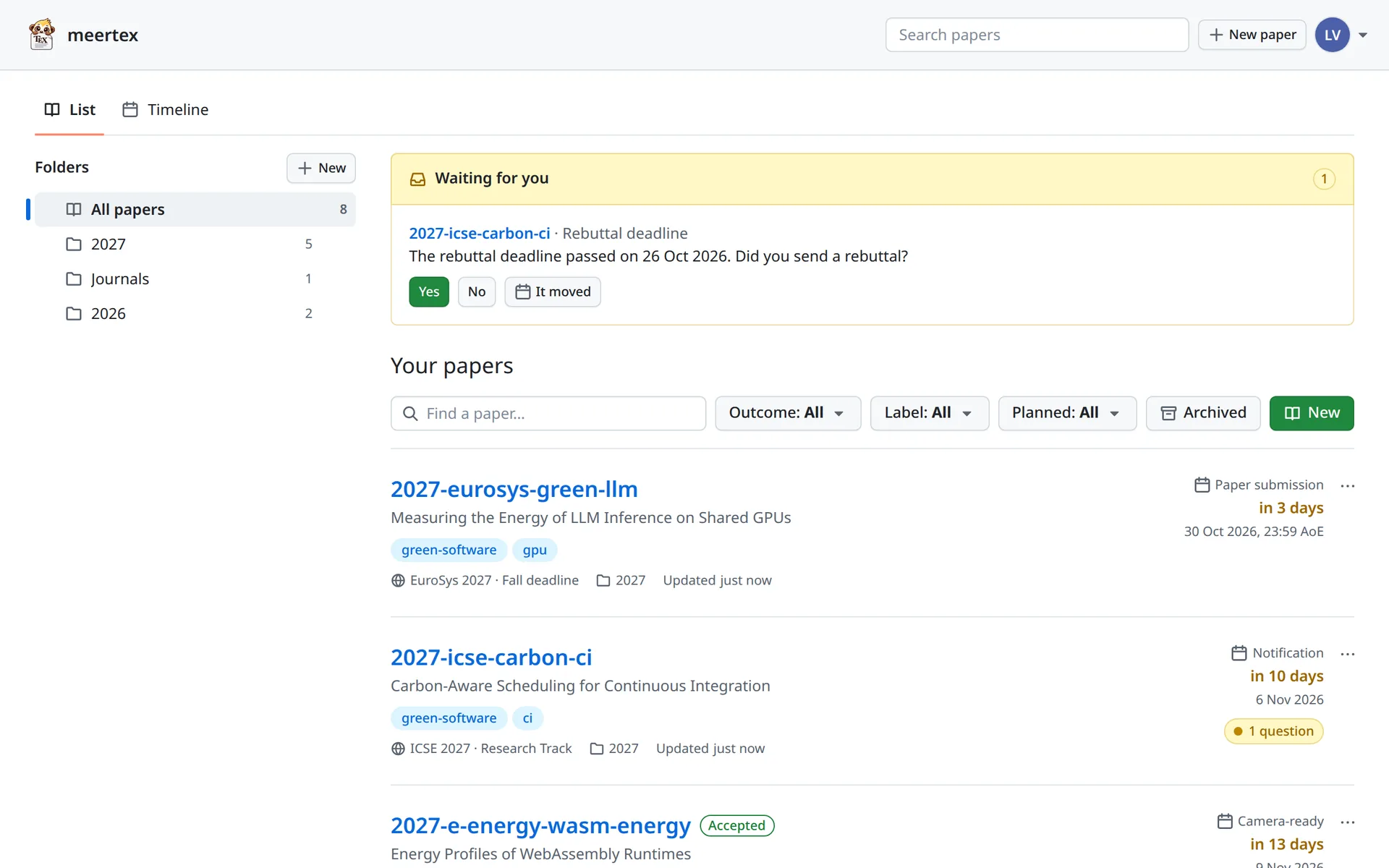
Your papers
Your folders, the next deadline of each paper with its countdown, outcomes,
labels and the question that waits for an answer.
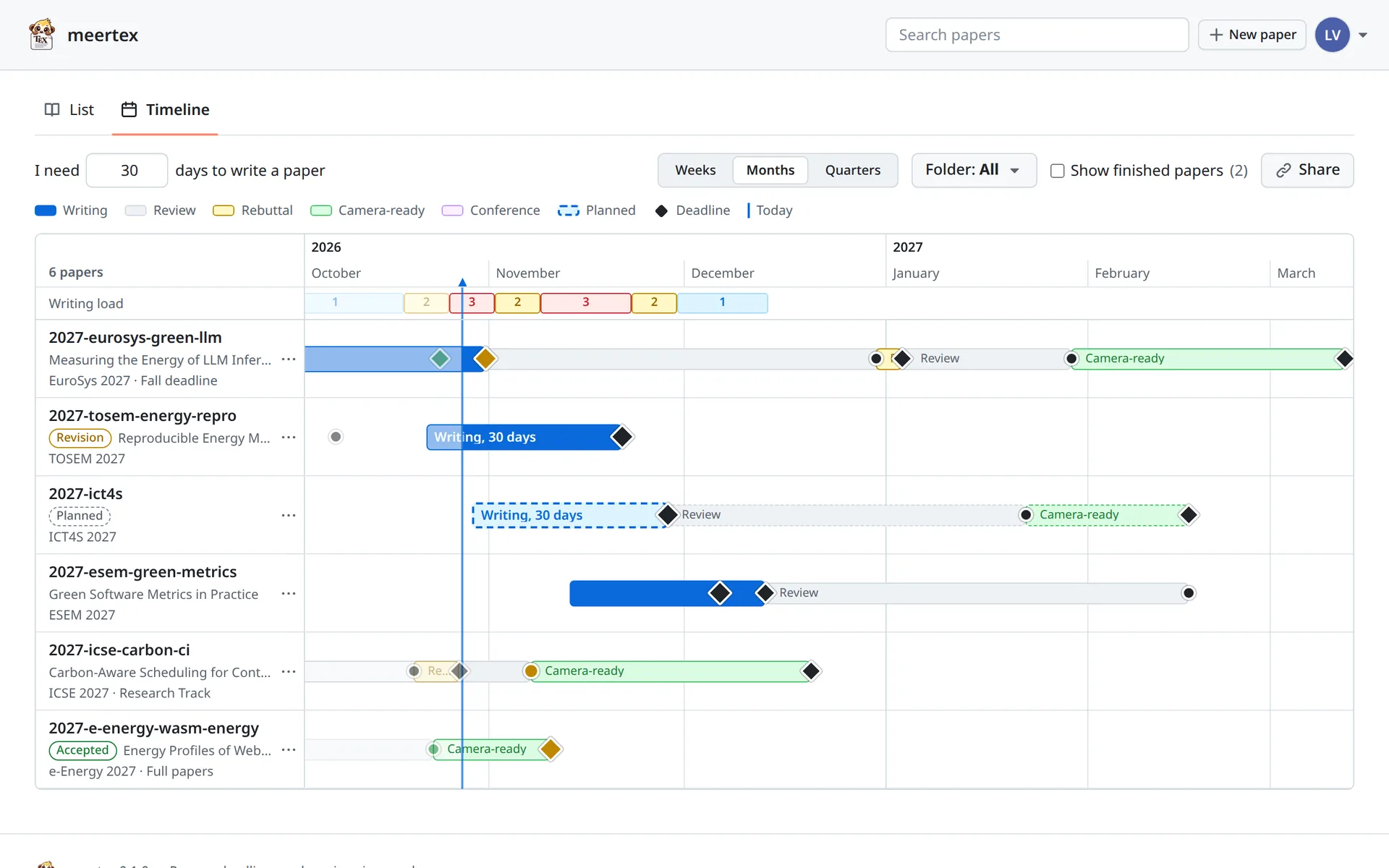
The timeline
Every paper and every planned venue on one chart, with your writing time before
each deadline. The writing load on top turns red when you write three at once.
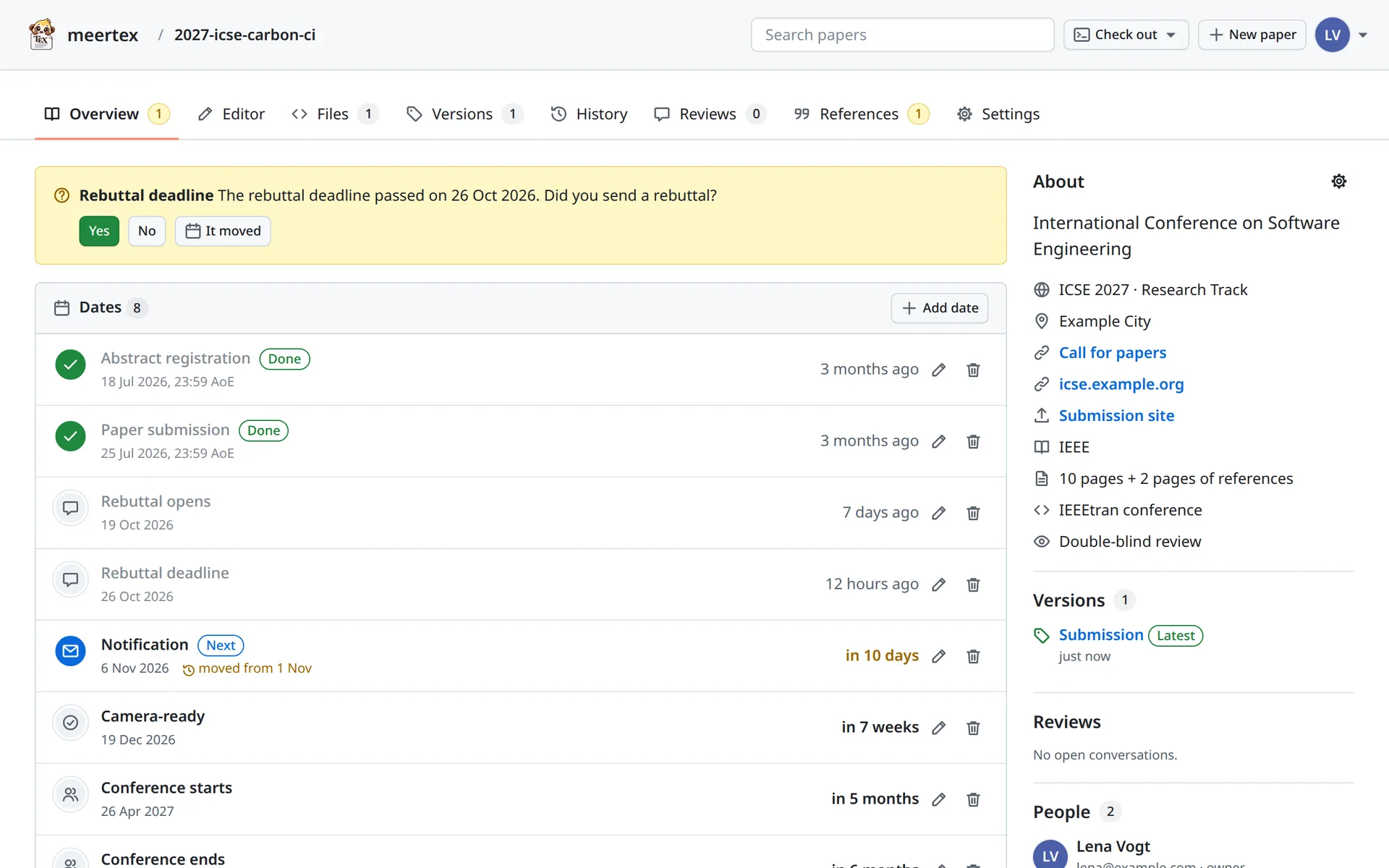
A paper's overview
The dates in the venue's time zone, a deadline that moved, the versions and the
venue's details. The banner asks whether the rebuttal went out.
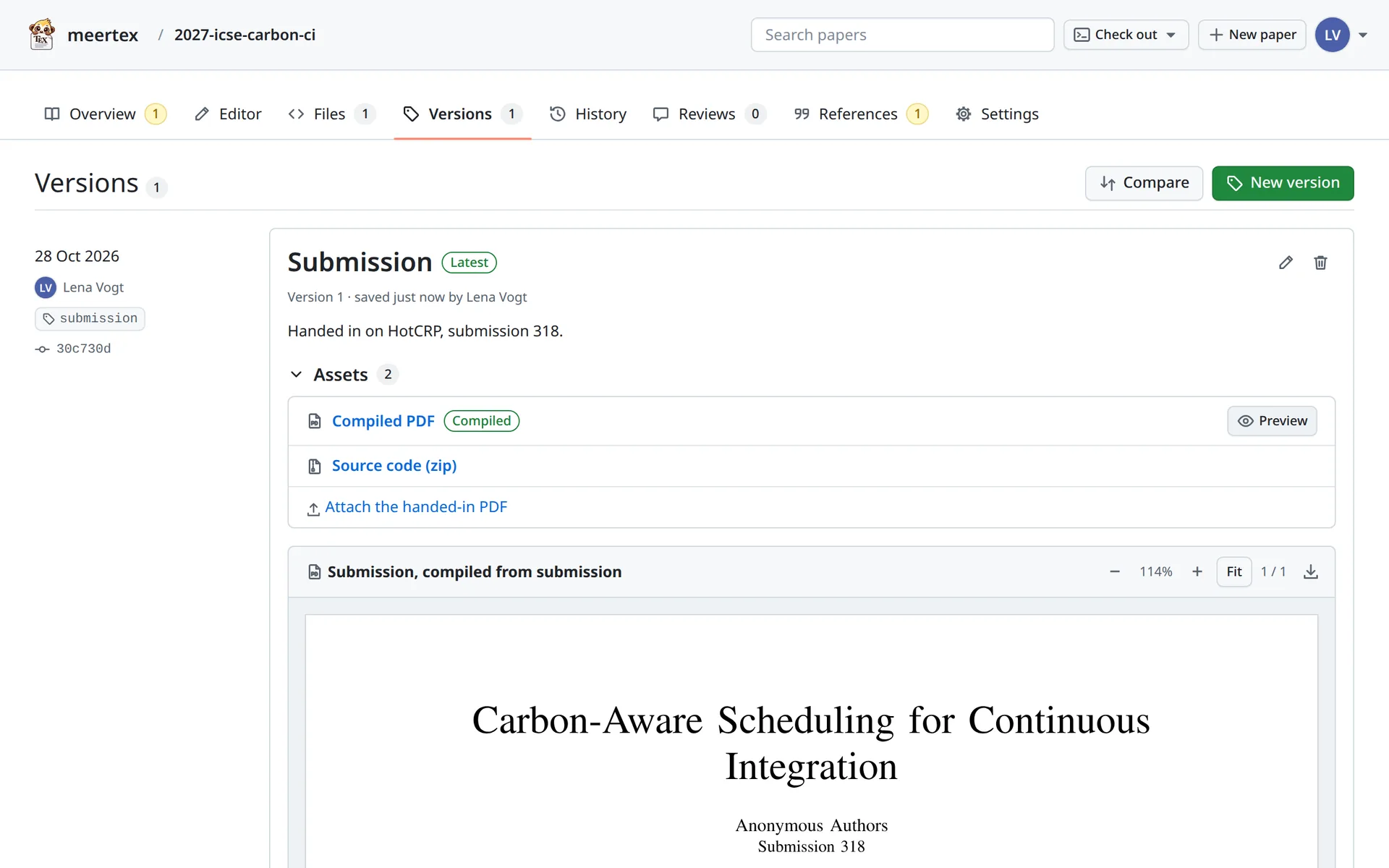
Versions
The submission as it was handed in, with its compiled PDF, the source as a zip
and a place for the PDF you uploaded to the submission site.
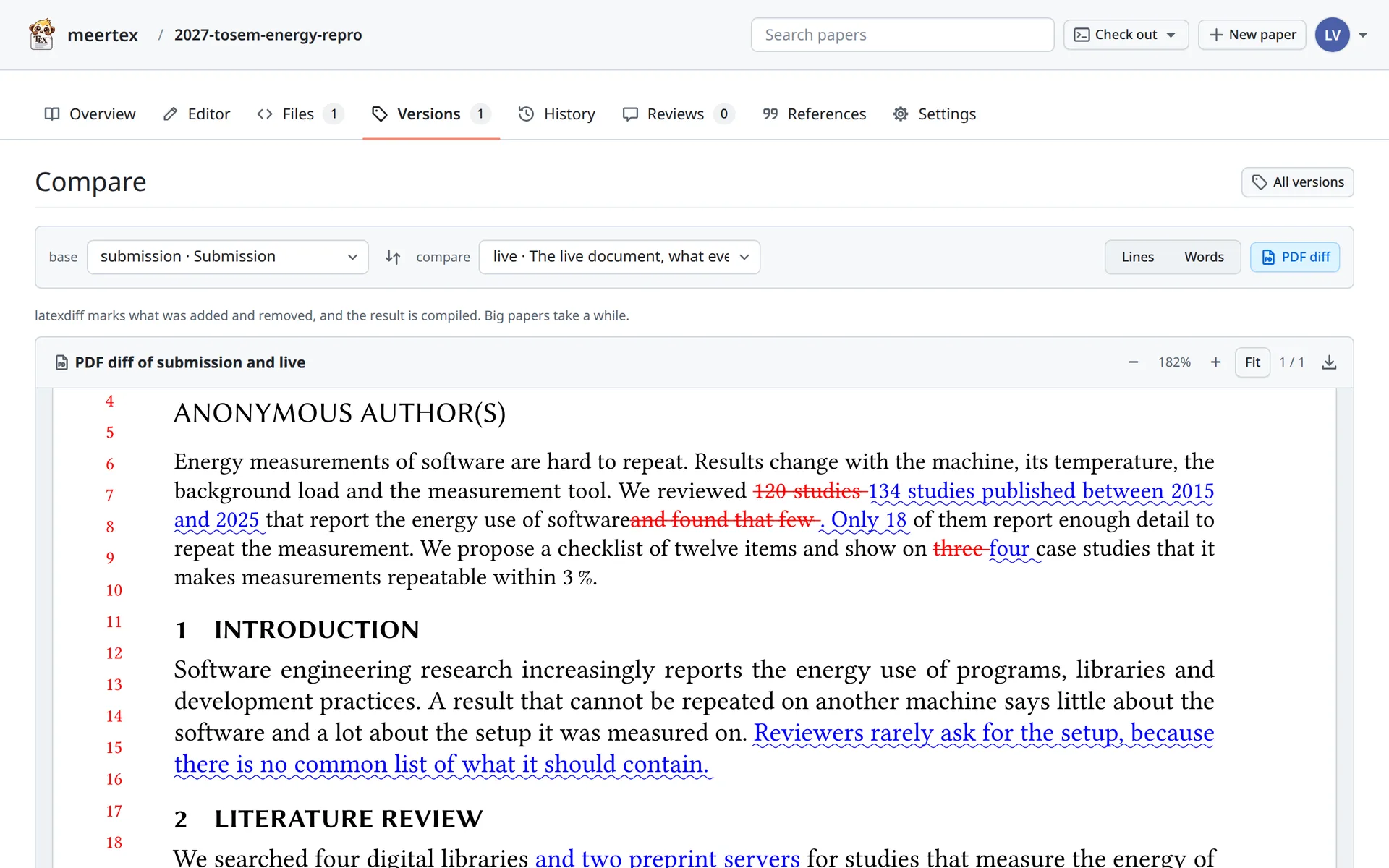
PDF diff
What changed between the submission and the revision, compiled with latexdiff
marks.
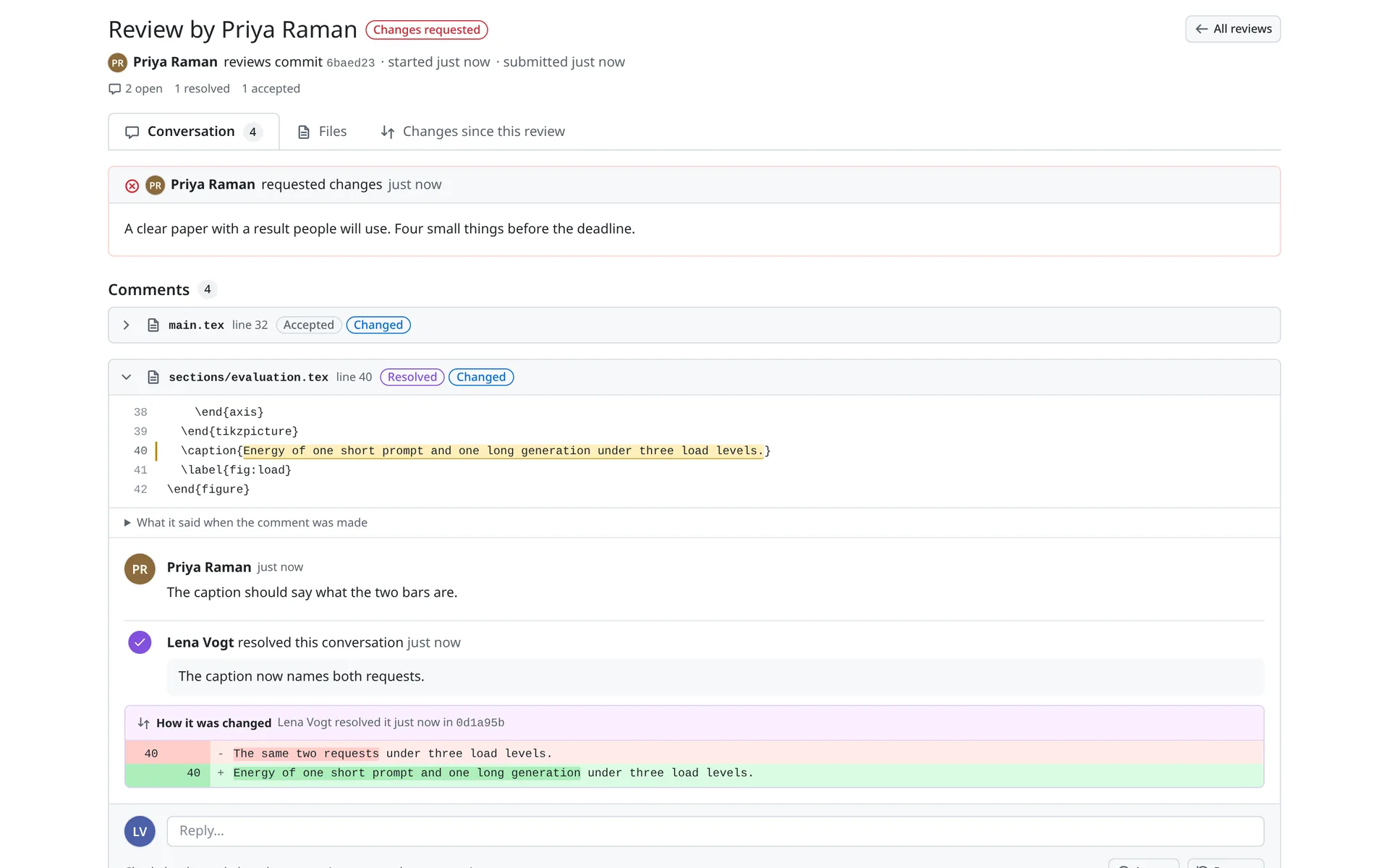
A review
Changes requested, with a suggestion that was applied and accepted, and a
caption that was rewritten. Resolving recorded how the text changed.
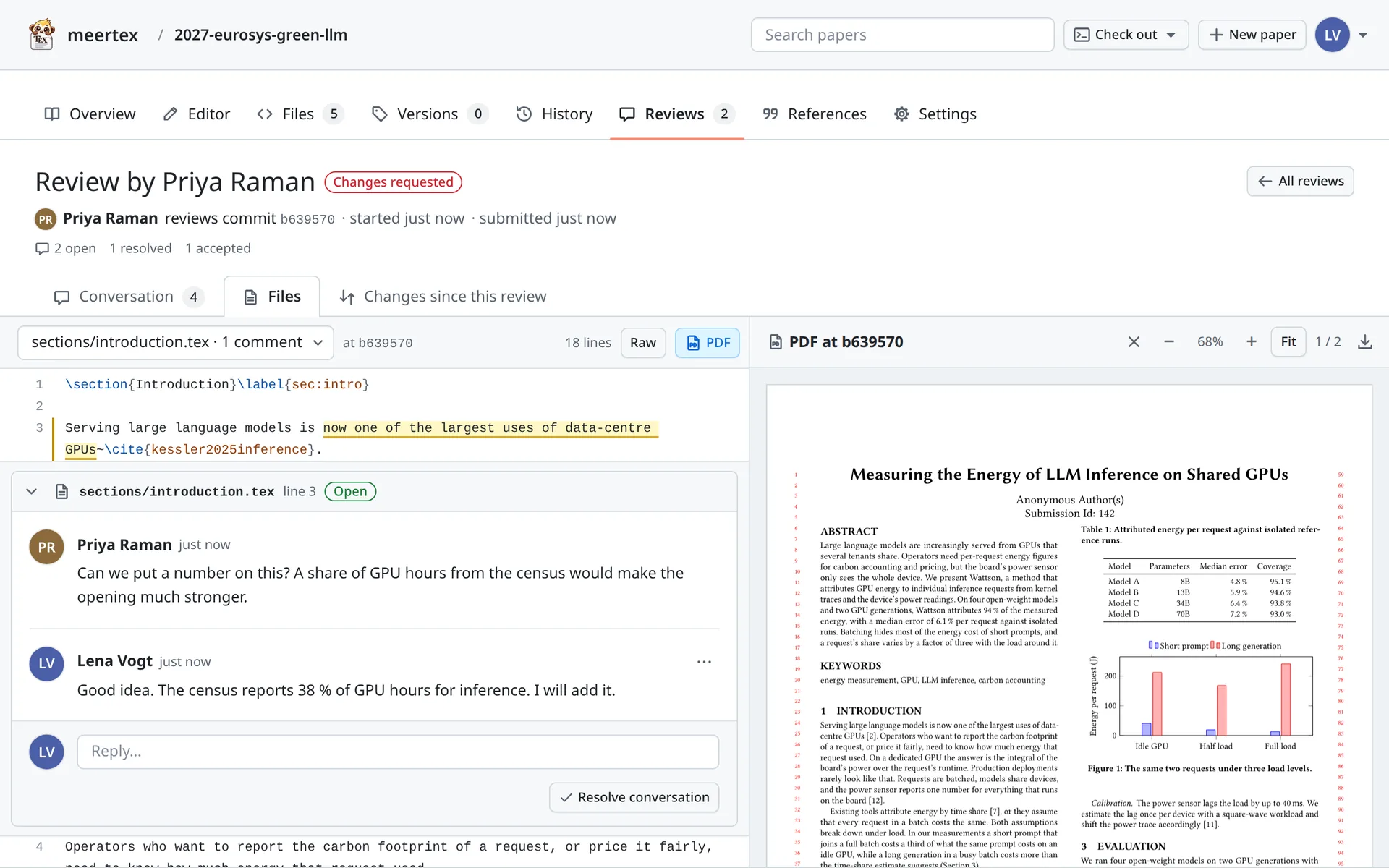
Reviewing the files
The source at the reviewed commit next to its PDF. Select text, or double-click
the PDF, to comment on that line.
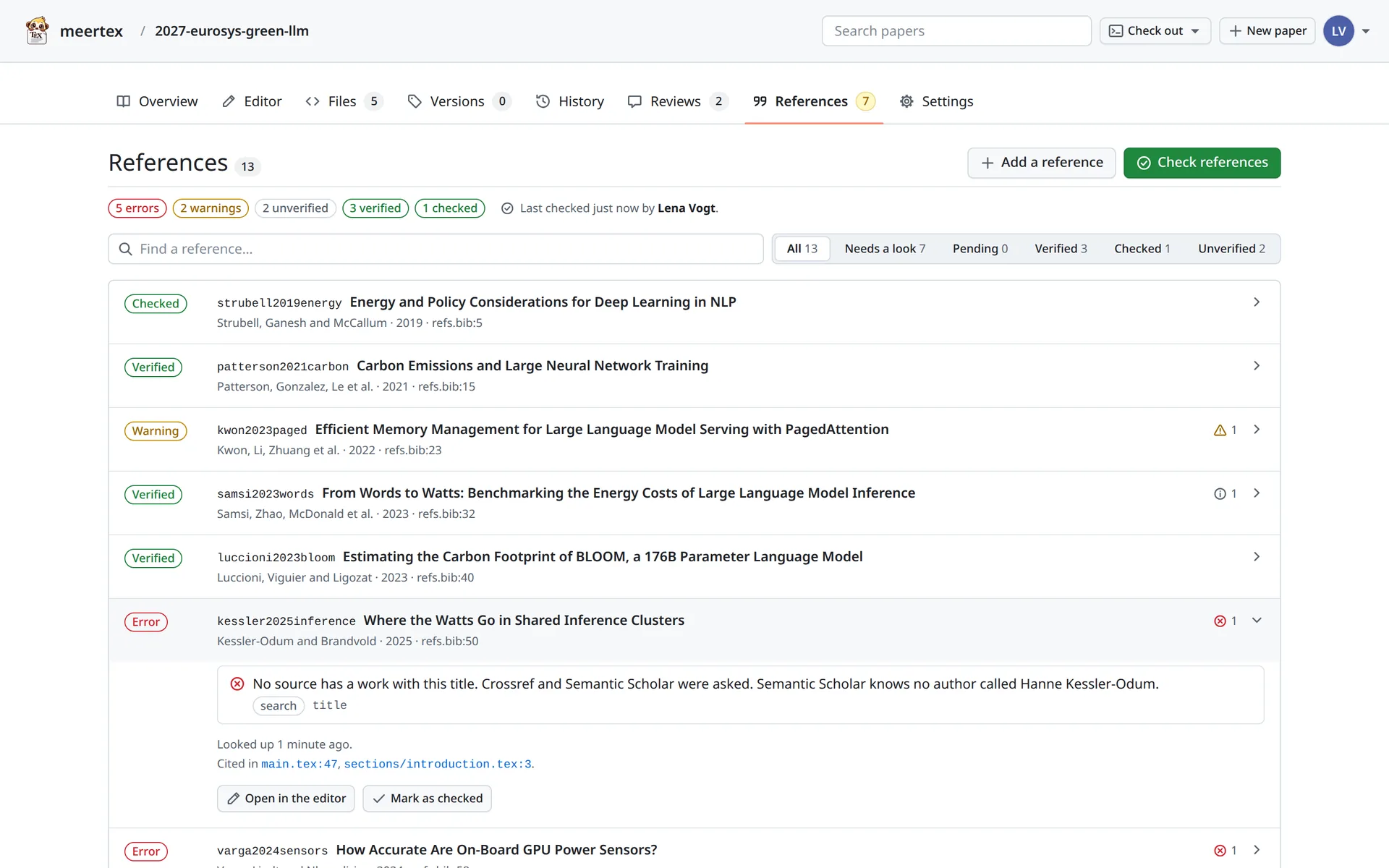
The reference check
Real works check out, one has the wrong year, and the invented one is in no
index. Lena marked the first entry as checked by hand.
Get started
Start writing on meertex.com
All you need is an email address. Your coauthors only need a browser.
1Sign in
Enter your email address and meertex mails you a link and a code. Either one
signs you in, and your account is ready. Start your first paper in the browser
right away, empty or from a publisher's template.
In a paper's settings, invite people by email as editors, reviewers or
viewers. They get an email, sign in the same way and write in the browser.
There is nothing to install.
3Get the folder on your computer
To write in your own editor or with an agent, install the meertex command line
tool from PyPI. It
needs Python 3.11 or newer. meertex login mails you a code, and
meertex checkout puts the paper in ~/papers.
meertex sync keeps every paper folder up to date while it runs.
On Linux and macOS, meertex service install runs it in the
background. On Windows, leave it running in a terminal window.
$ meertex service install # Linux, macOS$ meertex sync # Windows
Run your own server
meertex is open source, so you can also run it yourself, on a laptop with
Docker or on a server with Coolify. The README explains how. The command line
tool then signs in with meertex login --server and your server's
address.
The README covers running your own server and the layout of the code.
docs/DESIGN.md describes every field and command, and
docs/agent.md explains how an agent works with your papers.
The meertex skill starts a paper from a call for papers. It uses the
command line tool, so install that first. In the desktop
app, an LLM agent then writes with you next to the text.
From a call for papers to a new paper
Paste a conference URL into your LLM agent, and the
meertex-new-paper skill does the rest.
1It reads the call for papers and follows the links to the dates, the submission rules and the template.
2It takes the venue's fields and every deadline with its time zone, and leaves out what the page does not say.
3It creates the paper with the publisher's template and puts the folder in ~/papers/<name>.
With Ollama the model runs on your computer, and the paper stays there. To
answer quickly, a local model needs a graphics card.
Desktop app
meertex in a window of its own
The desktop app opens meertex.com in its own window, with its own icon in the
dock and the task bar. It keeps you signed in apart from your browser and shows
PDFs right in the app. It also brings the agent panel, which
runs the LLM agent of your computer next to the text. Everything else is the same
meertex, so most new features arrive without a new download.
macOS
Open the .dmg and drag meertex into Applications. Apple has not notarized the
app yet, so macOS stops its first start. Allow it once under System Settings,
Privacy & Security, "Open Anyway".
The .deb for Debian and Ubuntu and the .rpm for Fedora install meertex with
its menu entry, and the sign-in link in your mail opens the app. The AppImage
runs without installing.
Every change to the app is built and published on
GitHub.
For your own server, start the app with MEERTEX_URL set to its
address, as
electron/README.md
explains.